Acknowledgements in BizTalk
Today I want to talk to you about sending Acknowledgements from BizTalk which can be achieved with and without using Orchestration. Whenever we are using Request Response Receive adapter we need to send acknowledgements to the source application on receiving the message in the BizTalk. The Scenarios are listed down below:
– 2 way WCF-SAP Adapter
– 2 way MLLP Adapter
– 2 way WCF SQL Adapter
In some cases the messages just need an acknowledgement to ensure the message has reached the BizTalk and it is time to send the next message and in few other cases all the messages being sent are waiting for an acknowledgement to ensure the batch of messages in the queue can be deleted.
In few of the cases the acknowledgement are expected to the static response while in other cases they need some data, based on the received message, to be plugged in the response. There are many other Scenarios but just wanted to concentrate on very few ones here.
How to create the Acknowledgement and send it?
With Orchestration:
- Receive Message from Request-Response Port with Port bindings: ‘Specify later’
- Create the response (irrespective of the whether response is static or based on the request message) in the Construct Message Shape
- Send Response message through Request-Response Port as depicted in the figure below

This is the simplest approach but overhead is this approach uses the XLang engine for acknowledgement
With Pipeline:
- The Code for the Pipeline component responsible for promoting the properties required for Ack and also to send the Ack is as below:
| namespace PipelineComponents.Ack{
using System; using System.IO; using System.Text; using System.Drawing; using System.Resources; using System.Reflection; using System.Diagnostics; using System.Collections; using System.ComponentModel; using Microsoft.BizTalk.Message.Interop; using Microsoft.BizTalk.Component.Interop; using Microsoft.BizTalk.Component; using Microsoft.BizTalk.Messaging; using Microsoft.BizTalk.Streaming; [ComponentCategory(CategoryTypes.CATID_PipelineComponent)] [System.Runtime.InteropServices.Guid(“bbcf1287-f4fb-41f8-97b2-b329e5153658”)] [ComponentCategory(CategoryTypes.CATID_Any)] public class Ack : Microsoft.BizTalk.Component.Interop.IComponent, IBaseComponent, IPersistPropertyBag, IComponentUI { private System.Resources.ResourceManager resourceManager = new System.Resources.ResourceManager(“PipelineComponents.Ack.Ack”, Assembly.GetExecutingAssembly()); private bool _IsEnabled; public bool IsEnabled { get { return _IsEnabled; } set { _IsEnabled = value; } } private bool _IsStaticResponse; public bool IsStaticResponse { get { return _IsStaticResponse; } set { _IsStaticResponse = value; } } private bool _IsReceive; public bool IsReceive { get { return _IsReceive; } set { _IsReceive = value; } } private string _StaticResponse; public string StaticResponse { get { return _StaticResponse; } set { _StaticResponse = value; } } #region IBaseComponent members /// <summary> /// Name of the component /// </summary> [Browsable(false)] public string Name { get { return “Ack”; } } /// <summary> /// Version of the component /// </summary> [Browsable(false)] public string Version { get { return “1.0”; } } // Author: Nihar Malali /// <summary> /// Description of the component /// </summary> [Browsable(false)] public string Description { get { return “For Acknowledgment”; } } #endregion #region IPersistPropertyBag members // Author: Nihar Malali /// <summary> /// Gets class ID of component for usage from unmanaged code. /// </summary> /// <param name=”classid”> /// Class ID of the component /// </param> public void GetClassID(out System.Guid classid) { classid = new System.Guid(“bbcf1287-f4fb-41f8-97b2-b329e5153658″); } /// <summary> /// not implemented /// </summary> public void InitNew() { } // Author: Nihar Malali /// <summary> /// Loads configuration properties for the component /// </summary> /// <param name=”pb”>Configuration property bag</param> /// <param name=”errlog”>Error status</param> public virtual void Load(Microsoft.BizTalk.Component.Interop.IPropertyBag pb, int errlog) { object val = null; val = this.ReadPropertyBag(pb, “IsEnabled”); if ((val != null)) { this._IsEnabled = ((bool)(val)); } val = this.ReadPropertyBag(pb, “IsStaticResponse”); if ((val != null)) { this._IsStaticResponse = ((bool)(val)); } val = this.ReadPropertyBag(pb, “IsReceive”); if ((val != null)) { this._IsReceive = ((bool)(val)); } val = this.ReadPropertyBag(pb, “StaticResponse”); if ((val != null)) { this._StaticResponse = ((string)(val)); } } // Author: Nihar Malali /// <summary> /// Saves the current component configuration into the property bag /// </summary> /// <param name=”pb”>Configuration property bag</param> /// <param name=”fClearDirty”>not used</param> /// <param name=”fSaveAllProperties”>not used</param> public virtual void Save(Microsoft.BizTalk.Component.Interop.IPropertyBag pb, bool fClearDirty, bool fSaveAllProperties) { this.WritePropertyBag(pb, “IsEnabled”, this.IsEnabled); this.WritePropertyBag(pb, “IsStaticResponse”, this.IsStaticResponse); this.WritePropertyBag(pb, “IsReceive”, this.IsReceive); this.WritePropertyBag(pb, “StaticResponse”, this.StaticResponse); } #region utility functionality /// <summary> /// Reads property value from property bag /// </summary> /// <param name=”pb”>Property bag</param> /// <param name=”propName”>Name of property</param> /// <returns>Value of the property</returns> private object ReadPropertyBag(Microsoft.BizTalk.Component.Interop.IPropertyBag pb, string propName) { object val = null; try { pb.Read(propName, out val, 0); } catch (System.ArgumentException ) { return val; } catch (System.Exception e) { throw new System.ApplicationException(e.Message); } return val; } /// <summary> /// Writes property values into a property bag. /// </summary> /// <param name=”pb”>Property bag.</param> /// <param name=”propName”>Name of property.</param> /// <param name=”val”>Value of property.</param> private void WritePropertyBag(Microsoft.BizTalk.Component.Interop.IPropertyBag pb, string propName, object val) { try { pb.Write(propName, ref val); } catch (System.Exception e) { throw new System.ApplicationException(e.Message); } } #endregion #endregion #region IComponentUI members /// <summary> /// Component icon to use in BizTalk Editor /// </summary> [Browsable(false)] public IntPtr Icon { get { return ((System.Drawing.Bitmap)(this.resourceManager.GetObject(“COMPONENTICON”, System.Globalization.CultureInfo.InvariantCulture))).GetHicon(); } } /// <summary> /// The Validate method is called by the BizTalk Editor during the build /// of a BizTalk project. /// </summary> /// <param name=”obj”>An Object containing the configuration properties.</param> /// <returns>The IEnumerator enables the caller to enumerate through a collection of strings containing error messages. These error messages appear as compiler error messages. To report successful property validation, the method should return an empty enumerator.</returns> public System.Collections.IEnumerator Validate(object obj) { // example implementation: // ArrayList errorList = new ArrayList(); // errorList.Add(“This is a compiler error”); // return errorList.GetEnumerator(); return null; } #endregion #region IComponent members public Microsoft.BizTalk.Message.Interop.IBaseMessage Execute(Microsoft.BizTalk.Component.Interop.IPipelineContext pc, Microsoft.BizTalk.Message.Interop.IBaseMessage inmsg) { if (IsEnabled) { int bufferSize = 0x280; int thresholdSize = 0x100000; IBaseMessageContext messageContext = inmsg.Context; IBaseMessagePart bodyPart = inmsg.BodyPart; string msgout = “”; Stream inboundStream = bodyPart.GetOriginalDataStream(); VirtualStream virtualStream = new VirtualStream(bufferSize, thresholdSize); ReadOnlySeekableStream readOnlySeekableStream = new ReadOnlySeekableStream(inboundStream, virtualStream, bufferSize); if (IsReceive) { #region RecieveLogic string sysproperty_namespace = “http://schemas.microsoft.com/BizTalk/2003/system-properties”; try { string EpmRRCorrelationToken = String.Empty; bool RouteDirectToTP = true; object objEpmToken = messageContext.Read(“EpmRRCorrelationToken”, sysproperty_namespace); if (objEpmToken != null) EpmRRCorrelationToken = (string)objEpmToken; else EpmRRCorrelationToken = System.Guid.NewGuid().ToString(); messageContext.Promote(“EpmRRCorrelationToken”, sysproperty_namespace, EpmRRCorrelationToken); messageContext.Promote(“RouteDirectToTP”, sysproperty_namespace, RouteDirectToTP); readOnlySeekableStream.Position = 0; bodyPart.Data = readOnlySeekableStream; readOnlySeekableStream.Position = 0; bodyPart.Data = readOnlySeekableStream; } catch (Exception ex) { throw (ex); } #endregion } else { if (IsStaticResponse) msgout = StaticResponse; else { //comment the below line and add your Logic to create your Acknowledgement Message here msgout = StaticResponse; } } VirtualStream outStream = new VirtualStream(); StreamWriter sw = new StreamWriter(outStream, Encoding.Default); sw.Write(msgout); sw.Flush(); outStream.Seek(0, SeekOrigin.Begin); inmsg.BodyPart.Data = outStream; pc.ResourceTracker.AddResource(outStream); } return inmsg; } #endregion } } |
- Build and Deploy this Pipeline Component
- Add this component in any stage of the pipeline
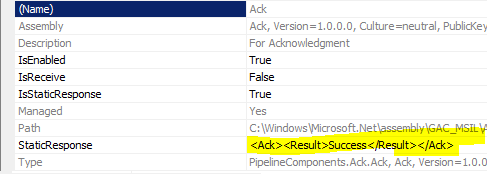
- The Configuration for Receive pipeline will look something like this

- The Configuration for the send pipeline will look something like this
How this works?
- If you look at the subscription you will observe that the Request-Response Receive location is has a subscription for response message and following screenshot depicts the details of the subscription

- Hence, Promote following 2 properties of the Request Message in Receive Pipeline of the Request-Response Receive Location
http://schemas.microsoft.com/BizTalk/2003/system-properties.EpmRRCorrelationToken
And
http://schemas.microsoft.com/BizTalk/2003/system-properties.RouteDirectToTP
- The moment the Request message hits the message box the request message will be picked up by the Subscription waiting on the response message
- Now if the Acknowledgement is expected to be Static then Hardcode the Message in the Send Pipeline else write the business logic for creating the response message with the Pipeline component
For Static Response this will work Amazing with no performance overhead..
Happy Coding!!!
NIHAR MALALI
 NIHAR MALALI