The Ultimate Guide to Docker: Revolutionizing Containerization
In the world of software development, efficiency, and scalability are paramount. Docker, an open-source containerization platform, has revolutionized the way developers package, ship, and run applications. Since its inception in 2013, Docker has become an indispensable tool for developers, sysadmins, and DevOps teams. In this comprehensive guide, we’ll delve into the world of Docker, exploring its benefits, architecture, components, and practical applications.
What is Docker?
Docker is a containerization platform that enables developers to package applications and their dependencies into a single container that can run consistently across different environments. This containerization approach ensures that applications are isolated from each other and from the host system, providing a lightweight and portable way to deploy applications.
Benefits of Docker
- Lightweight: Containers are significantly lighter than traditional virtual machines, requiring fewer system resources.
- Portable: Docker containers run consistently across different environments, including development, staging, and production.
- Isolated: Containers provide a secure and isolated environment for applications to run in.
- Efficient: Docker containers share the host kernel, reducing overhead and increasing performance.
- Scalable: Docker makes it easy to scale applications horizontally, adding or removing containers as needed.
Docker Architecture
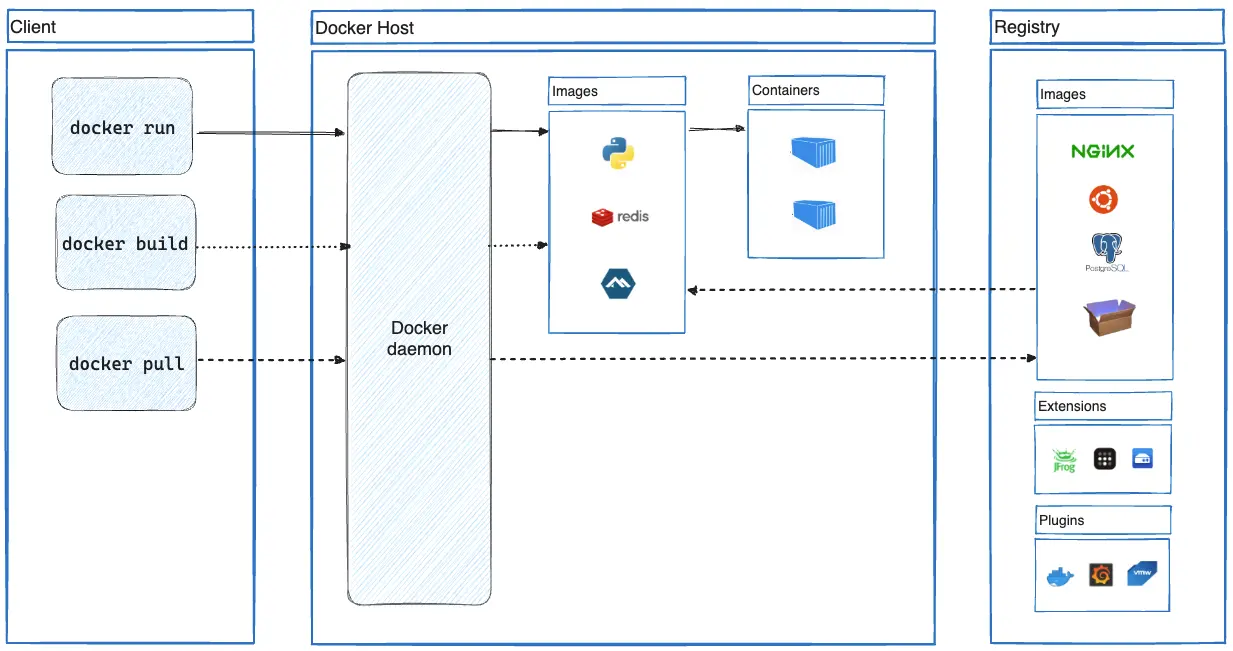
Docker’s architecture consists of the following components:
- Docker Engine: The runtime environment that manages containers.
- Docker Hub: A registry of Docker images.
- Docker Images: Templates for creating containers.
- Containers: Running instances of Docker images.
- Volumes: Persistent storage for containers.
Docker’s architecture is designed to provide a lightweight, portable, and efficient way to deploy applications. Lets explore each component in detail, examining their roles, functionalities, and interactions.
1. Docker Engine: The Runtime Environment
Docker Engine is the runtime environment that manages containers. It’s the backbone of Docker’s architecture, responsible for creating, running, and managing containers. The Docker Engine consists of:
- Docker Daemon: A background process that manages containers.
- Docker Client: A command-line interface (CLI) for interacting with the Docker Daemon.
- Containerd: A container runtime that manages container lifecycle.
Key Features:
- Container creation and management
- Network and volume management
- Image management
- Security and authentication
2. Docker Hub: The Registry of Docker Images
Docker Hub is a public registry of Docker images. It provides a centralized location for users to find, share, and manage Docker images. Docker Hub offers:
- Public Repositories: Shared images available for anyone to use.
- Private Repositories: Secure, private images for organizations.
- Official Images: Verified images from trusted vendors.
Key Features:
- Image discovery and search
- Image sharing and collaboration
- Automated builds and testing
- Security and vulnerability scanning
3. Docker Images: Templates for Creating Containers
Docker Images are templates for creating containers. They contain the application code, dependencies, and configurations required to run an application. Docker Images are:
- Immutable: Cannot be changed once created.
- Layered: Consist of multiple layers for efficient updates.
- Portable: Run consistently across environments.
Key Features:
- Application code and dependencies
- Configuration and environment variables
- Layered architecture for efficient updates
- Portable across environments
4. Containers: Running Instances of Docker Images
Containers are running instances of Docker Images. They provide a isolated environment for applications to run in, with their own:
- File System: Isolated from the host system.
- Networking: Configurable network settings.
- Processes: Isolated process space.
Key Features:
- Lightweight and portable
- Isolated from host system and other containers
- Configurable networking and storage
- Efficient resource utilization
5. Volumes: Persistent Storage for Containers
Volumes provide persistent storage for containers. They allow data to be persisted outside the container’s lifecycle, enabling:
- Data Persistence: Data remains even after container deletion.
- Data Sharing: Multiple containers can access shared data.
- Data Backup: Easy backup and recovery.
Key Features:
- Persistent storage for containers
- Data sharing between containers
- Data backup and recovery
- Configurable storage drivers
Key Docker Concepts
- Images: Immutable templates for creating containers.
- Containers: Running instances of images.
- Volumes: Persistent storage for containers.
- Networking: Communication between containers.
- Docker Compose: A tool for defining and running multi-container applications.
Practical Applications of Docker
- Web Development: Docker simplifies the development process by providing a consistent environment.
- Microservices Architecture: Docker enables the deployment of multiple services as separate containers.
- Continuous Integration/Continuous Deployment (CI/CD): Docker streamlines the testing and deployment process.
- Big Data: Docker provides a scalable and efficient way to process large datasets.
- Cloud Computing: Docker supports deployment on cloud platforms like AWS, Azure, and Google Cloud.
Docker Security
- Kernel Security: Docker leverages kernel security features.
- Container Isolation: Containers are isolated from each other and the host system.
- Network Security: Docker provides network controls.
- Image Security: Docker images are signed and verified.
Docker Best Practices
- Keep Images Small: Optimize image size.
- Use Volumes: Persist data outside containers.
- Monitor Containers: Track container performance.
- Implement Security: Follow Docker security guidelines.
- Use Docker Compose: Simplify multi-container applications.
Prerequisites
- Docker installed on your machine (download from https://www.docker.com/get-started)
- Basic knowledge of command-line interfaces
- Text editor or IDE for creating Dockerfile
Get Started with Docker and Dockerfile Tutorial
Step 1: Install Docker
Download and install Docker from the official website. Follow the installation instructions for your operating system.
Step 2: Verify Docker Installation
Open a terminal or command prompt and run:
docker --version
This should display the Docker version installed.
Step 3: Create a Dockerfile
Create a new file named Dockerfile in a directory of your choice. This file will contain instructions for building your Docker image.
Basic Dockerfile Example
Docker
# Use an official Python image as a base
FROM python:3.9-slim

# Set the working directory in the container
WORKDIR /app

# Copy the current directory contents into the container at /app
COPY . /app

# Install any needed packages specified in requirements.txt
RUN pip install --trusted-host pypi.python.org -r requirements.txt

# Make port 80 available to the world outside this container
EXPOSE 80

# Define environment variable
ENV NAME World

# Run app.py when the container launches
CMD ["python", "app.py"]
Let’s break down what each line does:
FROM: Uses an official Python 3.9 image as the base.WORKDIR: Sets the working directory in the container.COPY: Copies the current directory contents into the container.RUN: Installs dependencies specified inrequirements.txt.EXPOSE: Makes port 80 available.ENV: Defines an environment variable.CMD: Specifies the command to run when the container launches.
Step 4: Build Docker Image
Navigate to the directory containing your Dockerfile and run:
docker build -t my-python-app .
This command builds a Docker image with the tag my-python-app.
Step 5: Run Docker Container
Run the container using:
docker run -p 8080:80 my-python-app
This maps port 8080 on your host machine to port 80 in the container.
Step 6: Verify Container is Running
Open a web browser and navigate to http://localhost:8080. You should see your Python application running.
Common Docker Commands
docker ps: List running containers.docker stop <container_id>: Stop a container.docker rm <container_id>: Remove a container.docker images: List available images.docker rmi <image_id>: Remove an image.
Docker has revolutionized the way developers package, ship, and run applications. Its benefits, including lightweight, portable, and isolated containers, make it an indispensable tool for modern software development. By understanding Docker’s architecture, components, and practical applications, developers can harness its full potential to streamline development, improve scalability, and enhance security.
By embracing Docker, developers can unlock new levels of efficiency, scalability, and reliability in their applications, ultimately driving innovation and success in the ever-evolving world of software development.
 NIHAR MALALI