The Ultimate Guide to Kubernetes: Scaling and Managing Containerized Applications
In our previous article, we explored the world of Docker, a popular containerization platform. Now, we’ll delve into Kubernetes, an open-source container orchestration system that automates deployment, scaling, and management of containerized applications. Kubernetes has become the de facto standard for managing complex distributed systems, and in this comprehensive guide, we’ll cover its architecture, components, features, and best practices.
What is Kubernetes?
Kubernetes (also known as K8s) is an open-source container orchestration system that automates deployment, scaling, and management of containerized applications. It provides a framework for deploying and managing applications in a distributed environment, ensuring high availability, scalability, and reliability.
History of Kubernetes
Kubernetes was originally developed by Google, leveraging their experience with containerization and cluster management. The project was open-sourced in 2014 and has since become one of the fastest-growing open-source projects in history.
Kubernetes Architecture
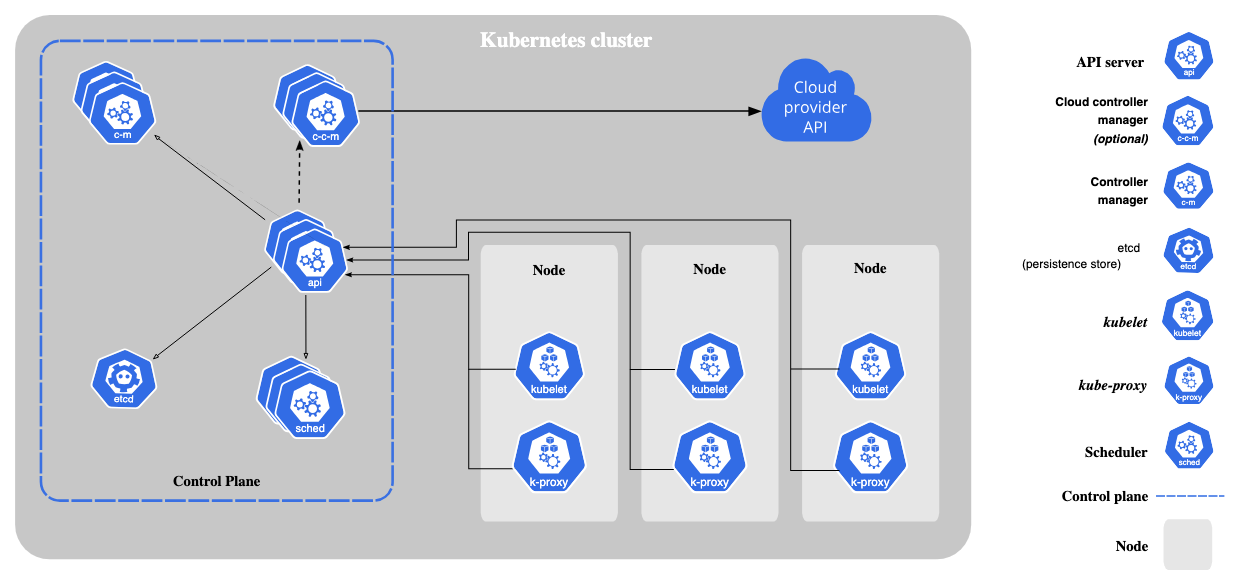
Kubernetes architecture is designed to provide a scalable, flexible, and fault-tolerant framework for managing containerized applications. At its core, Kubernetes consists of several key components that work together to provide a robust and efficient platform.
1. Nodes
Nodes are worker machines that run containers. They can be physical or virtual machines, and are responsible for executing the workload. Each Node has a unique identifier and is managed by the Kubernetes Control Plane.
Node Components:
- Kubelet: An agent that runs on each Node, responsible for managing containers.
- Container Runtime: Software that executes containers (e.g., Docker).
- Network: Provides connectivity between Nodes.
2. Pods
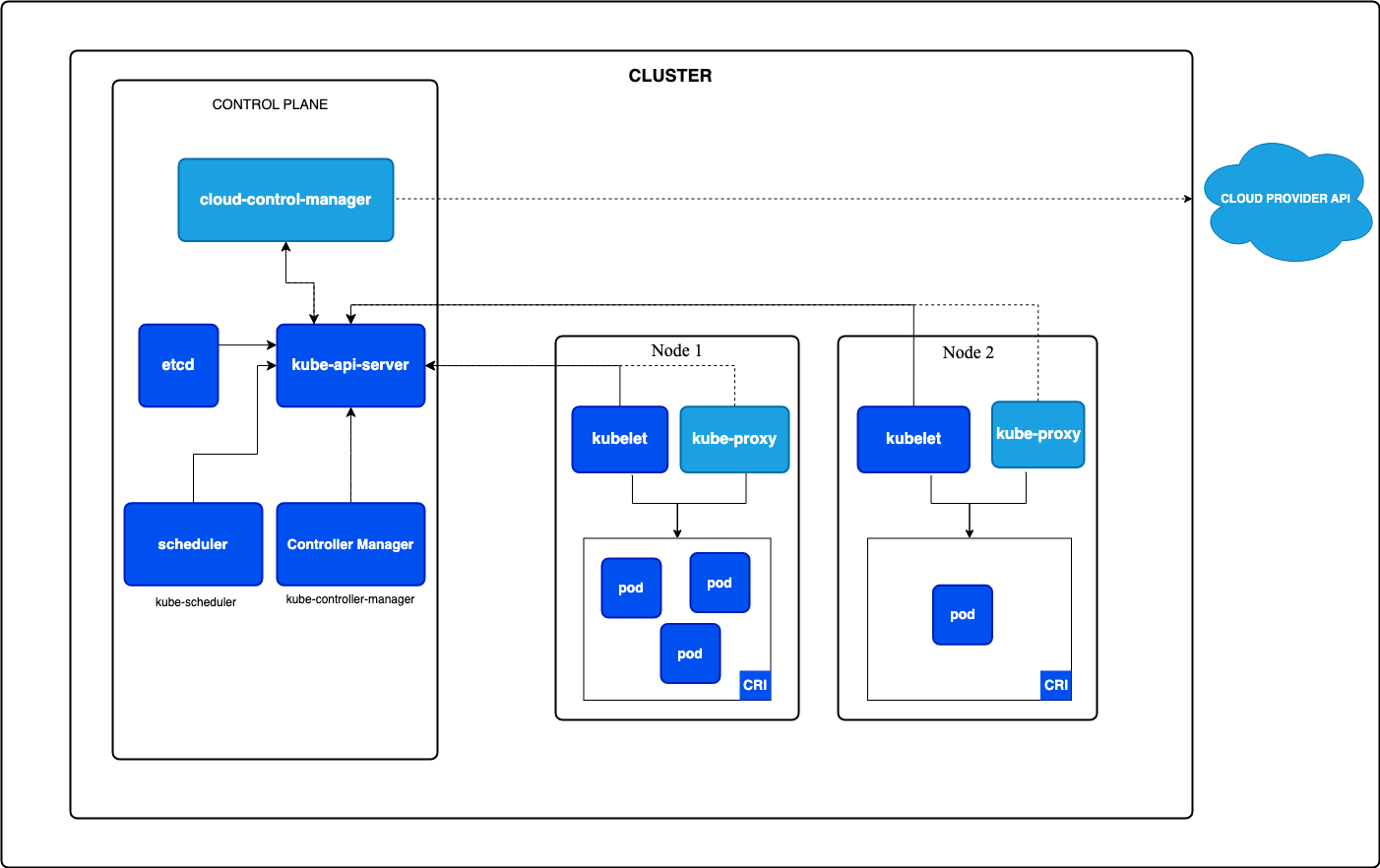
Pods are logical hosts for containers. They represent a single instance of a running application and can contain one or more containers. Pods provide a shared network namespace and resources for their containers.
Pod Characteristics:
- Ephemeral: Pods are temporary and can be replaced.
- Replicable: Pods can be replicated for scalability.
- Networked: Pods have a unique IP address.
3. ReplicaSets
ReplicaSets ensure a specified number of replicas (identical Pods) are running. They maintain a consistent number of replicas, even in the event of Node failures.
ReplicaSet Features:
- Replication: Ensures multiple instances of Pods.
- Scaling: Adjusts replica count.
- Self-healing: Replaces failed Pods.
4. Deployments
Deployments manage rollouts and rollbacks of Pods. They provide a controlled approach to updating applications.
Deployment Features:
- Rollouts: Gradual replacement of Pods.
- Rollbacks: Reverts to previous version.
- History: Tracks changes.
5. Services
Services provide network identity and load balancing. They enable communication between Pods and external services.
Service Types:
- ClusterIP: Exposes Pod within cluster.
- NodePort: Exposes Pod outside cluster.
- LoadBalancer: Distributes traffic.
6. Persistent Volumes
Persistent Volumes provide persistent storage for data. They decouple storage from Pods, ensuring data persistence.
Persistent Volume Features:
- Persistent Storage: Data remains even after Pod deletion.
- Dynamic Provisioning: Automatically allocates storage.
7. Namespaces
Namespaces partition resources and provide isolation. They enable multiple applications to share a cluster.
Namespace Features:
- Resource Quotas: Limits resource usage.
- Network Policies: Controls traffic flow.
- Security: Isolates applications.
8. Control Plane
The Control Plane manages the cluster, comprising:
- API Server: Entry point for Kubernetes API.
- Scheduler: Assigns Pods to Nodes.
- Controller Manager: Runs and manages controllers.
- etcd: Distributed key-value store.
Control Plane Features:
- Cluster Management: Oversees Node and Pod lifecycle.
- Resource Allocation: Manages resource usage.
- Security: Authenticates and authorizes access.
Interactions Between Components
The Kubernetes architecture components interact as follows:
- Nodes run Pods.
- ReplicaSets manage Pod replication.
- Deployments manage Pod rollouts.
- Services provide network identity.
- Persistent Volumes provide storage.
- Namespaces partition resources.
- Control Plane manages the cluster.
Key Kubernetes Concepts
- Clusters: Groups of Nodes.
- Pods: Smallest deployable units.
- Containers: Running processes within Pods.
- Replication: Ensuring multiple instances of Pods.
- Scaling: Adjusting replica counts.
- Self-healing: Automatically replacing failed Pods.
- Resource Management: Allocating resources (CPU, memory).
Kubernetes Features
- Automatic Bin Packing: Efficient resource allocation.
- Self-healing: Automatically replacing failed Pods.
- Resource Monitoring: Real-time monitoring.
- Scaling: Horizontal and vertical scaling.
- Rollouts and Rollbacks: Controlled deployment.
- Service Discovery: Automatic service registration.
- Security: Network policies and secret management.
Kubernetes Components
- API Server: Entry point for Kubernetes API.
- Scheduler: Assigns Pods to Nodes.
- Controller Manager: Runs and manages controllers.
- Worker Nodes: Run Pods.
- etcd: Distributed key-value store.
Kubernetes Deployment Strategies
- Recreate: Replace existing Pods.
- Rolling Update: Gradual replacement.
- Blue/Green: Parallel deployment.
- Canary: Phased rollout.
Kubernetes Security
- Network Policies: Control traffic flow.
- Secrets: Secure sensitive data.
- Role-Based Access Control (RBAC): Manage access.
- Pod Security Policies: Enforce security standards.
Kubernetes Best Practices
- Use ConfigMaps: Externalize configuration.
- Implement Monitoring: Track performance.
- Use Persistent Volumes: Ensure data persistence.
- Optimize Resource Allocation: Efficient resource use.
- Implement Rolling Updates: Controlled deployment.
Real-World Use Cases
- Web Applications: Scalable and highly available.
- Microservices Architecture: Manage complex systems.
- Big Data: Distributed processing.
- Machine Learning: Scalable model training.
Kubernetes has revolutionized the way organizations deploy, scale, and manage containerized applications. Its robust architecture, features, and best practices make it an essential tool for any organization adopting cloud-native technologies.
 NIHAR MALALI